Christmas Planner Canva Templates | PAC: Your Holiday Command Center
Why This Planner System Works for Busy Creatives
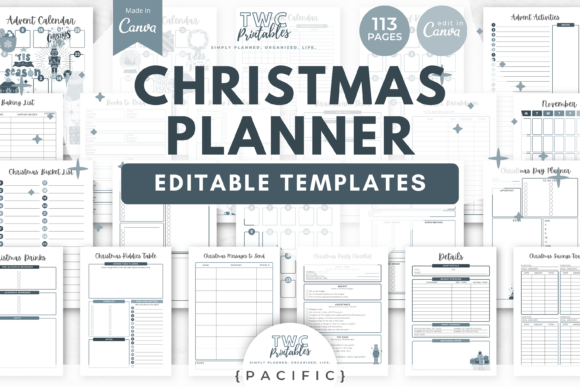
Let's be honest. The holidays sneak up fast, and even the most organized among us find ourselves scrambling come December. That's where the Christmas Planner Canva Templates from PAC steps in—not as another pretty download that collects digital dust, but as a genuinely functional system built for real planning. With 113 editable templates organized into a Pacific theme, this collection gives you structure without rigidity. You get the scaffolding; you bring the personality.
The visual language here leans into warm terracotta tones paired with muted greens. It feels seasonal without being cliché. There are no cartoon reindeer or glitter explosions. Instead, the design carries a modern, grounded aesthetic that appeals to adults who want their planning tools to look as considered as their holiday tables. The templates arrive in both A4 and US Letter sizes, which matters more than people realize—especially if you're printing at home or sending files to a local print shop.
What's Actually Inside the Christmas Planner Canva Template
The core planner contains 83 sheets, and the breadth is impressive. You're not just getting a checklist and a calendar. The Christmas Planner Canva Templates | PAC includes budget breakdowns, expense tracking, menu planning with portion guides, oven space planners, and dietary requirement sheets. For anyone hosting even a modest gathering, these details save real headaches. The gift section alone covers ideas, lists, stocking stuffers, wishlists, and supplies tracking. Add in Christmas card lists, thank you cards, and message templates, and you've got correspondence handled too.
What makes this collection stand out from generic planners is the editable nature of every single page inside Canva. Nothing is locked down. You can swap fonts, adjust colors, move elements around, resize shapes, and completely restyle layouts. If terracotta doesn't suit your brand or your kitchen, pull in your own palette. If you prefer a serif font for headings and a clean sans serif for body text, make that swap in minutes. The templates function as starting points rather than finished products, which is exactly how professional design assets should work.
Practical Applications Beyond Personal Holiday Planning
Here's where things get interesting for entrepreneurs, bloggers, and small business owners. The Christmas Planner Canva Templates | PAC aren't limited to personal use. Consider how a lifestyle blogger might repurpose the menu planning sheets into downloadable content for their audience. A small bakery could use the baking list and recipe templates to organize seasonal production schedules. Marketing teams at boutique brands might adapt the budget overview sheets for holiday campaign tracking.
The template structure also lends itself well to client-facing work. If you're a virtual assistant or project manager, having a polished, branded planning system to share with clients during the fourth quarter adds a layer of professionalism that spreadsheets simply can't match. The Christmas Party Details and Complete Christmas Party Checklist sheets work beautifully for event planners coordinating multiple client celebrations simultaneously. You duplicate the template, customize it per client, and suddenly you have a branded deliverable that looks custom-designed.
Design Flexibility and Brand Consistency
One of the strongest aspects of working within Canva's ecosystem is the ability to maintain brand consistency across every touchpoint. The Christmas Planner Canva Templates | PAC makes this straightforward. Upload your brand fonts, save your color codes, and apply them across all 113 templates in a single session. The Pacific theme provides cohesion—everything feels connected—but the underlying structure supports complete visual overhaul.
This flexibility matters for content creators who publish holiday guides, gift roundups, or seasonal marketing materials. Imagine pulling the Gift Ideas layout and adapting it into a social media carousel. Or taking the Christmas Drinks template and turning it into an Instagram story series. The bones are there. The design thinking is baked in. You're simply redirecting the output toward your specific audience and platform.
The color palette deserves a closer look. Terracotta and green sit in an interesting space—they feel autumnal and warm without crossing into Halloween territory, and they carry enough sophistication to work in editorial design contexts. For packaging design or product photography backdrops during the holiday season, these tones photograph well and complement both warm and cool lighting setups. If you're creating cohesive visual content across print and digital channels, starting with a thoughtfully curated palette saves considerable time in post-production.
Making the Most of Your Investment
A few practical recommendations for anyone working with the Christmas Planner Canva Templates | PAC. First, spend thirty minutes upfront organizing your Canva folders. Duplicate the master templates before editing so you always have clean copies to return to. Second, test your customized versions by printing a few key pages before committing to a full print run. Screen colors and printer outputs differ, especially with muted tones like terracotta. Third, consider which sheets you'll actually use versus which ones simply look appealing. Eighty-three pages is generous, but your planning workflow probably centers on ten to fifteen core documents. Identify those first, perfect them, and expand from there.
For those using these templates commercially—selling planners, offering planning services, or creating content products—review Canva's licensing terms carefully. The templates themselves are editable design assets, but how you redistribute them matters. Typically, you can sell finished, flattened PDF versions of your customized planners. Selling the editable Canva template links themselves usually requires different licensing. When in doubt, check the specific terms attached to your purchase.
The holiday season doesn't have to mean chaos. With the right planning tools and the willingness to customize them to fit your actual workflow, December becomes something you navigate with confidence rather than survive through. The Christmas Planner Canva Templates | PAC gives you that foundation—thoughtfully designed, genuinely flexible, and built for people who take their planning as seriously as their celebrations.